
关于GrabPass的介绍
GrabPass是一种Unity shader语言中的指令,它允许在一个Pass中捕获屏幕上之前渲染的纹理到一个变量中。这个变量在后面的Pass中可以被用来进行其他的计算或作为纹理使用。
通常情况下,当我们需要在一个shader中对一个屏幕上已经绘制的像素进行处理时,比如实现全局反射等效果,我们需要将屏幕中内容先渲染到一张纹理中,然后再将其传入Shader中。而使用GrabPass可以直接在Shader中获取当前屏幕的纹理,避免了中间转换的步骤,提高了渲染效率。
官方文档 https://docs.unity3d.com/Manual/SL-GrabPass.html
基础示例
1
2
3
4
5
6
7
8
9
10
11
12
13
14
15
16
17
18
19
20
21
22
23
24
25
26
27
28
29
30
31
32
33
34
35
36
37
38
39
40
41
42
43
44
45
46
47
48
49
50
51
52
53
54
55
56
57
58
| Shader "Custom/GrabPassExample" {
Properties {
_MainTex ("Texture", 2D) = "white" {}
}
SubShader {
Pass {
GrabPass { "_GrabScreenTexture" }
CGPROGRAM
#pragma vertex vert
#pragma fragment frag
sampler2D _MainTex;
sampler2D _GrabScreenTexture;
struct appdata {
float4 vertex : POSITION;
float2 uv : TEXCOORD0;
};
struct v2f {
float2 uv : TEXCOORD0;
float4 grabPos : TEXCOORD1;
float4 vertex : SV_POSITION;
};
inline float4 ComputeScreenPos (float4 pos)
{
#if UNITY_UV_STARTS_AT_TOP
float scale = -1.0;
#else
float scale = 1.0;
#endif
float4 o = pos * 0.5f;
o.xy = float2(o.x, o.y*scale) + o.w;
o.zw = pos.zw;
return o;
}
v2f vert (appdata v) {
v2f o;
o.vertex = UnityObjectToClipPos(v.vertex);
o.uv = v.uv;
o.grabPos = ComputeGrabScreenPos(v.vertex);
return o;
}
fixed4 frag (v2f i) : SV_Target {
fixed4 col = tex2D(_GrabScreenTexture, i.grabPos);
return col;
}
ENDCG
}
}
FallBack "Diffuse"
}
|
性能问题
一种是直接GrabPass{},将抓取到的纹理贴图存储在系统的_GrabScreenTexture变量中,但是会导致GrabPass的物体都进行抓屏操作。
另一种是GrabPass{“Name”},其中Name为自定义的贴图名称,只为第一个使用的物体进行抓屏,后续的则可复用该贴图,数量多时会大幅提升性能
渲染队列
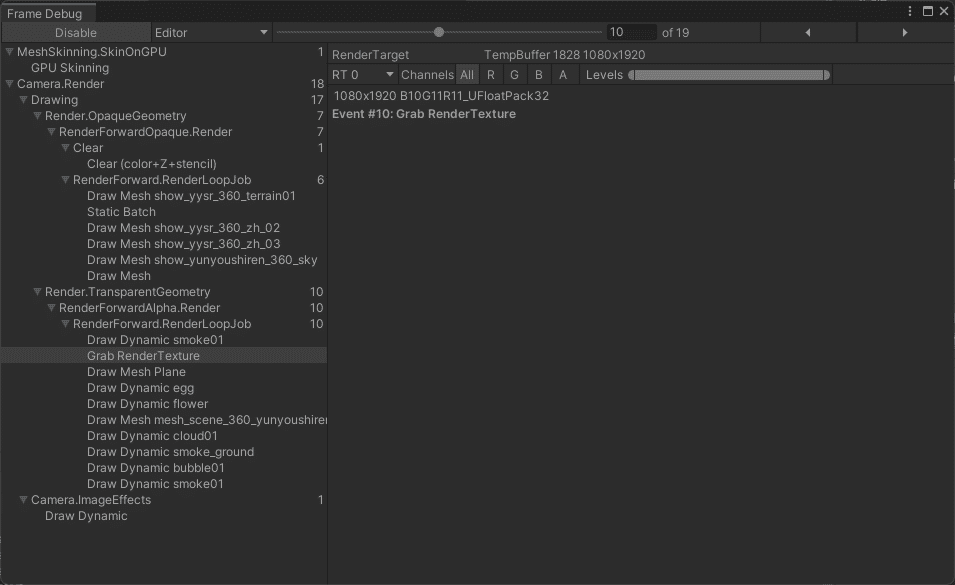
GrabPass通常在渲染透明物体使用比较多,即需要把渲染队列设置成透明队列(即”Queue”=“Transparent”).这样才能保证当渲染该物体时,所有的不透明物体都已经被绘制在屏幕上了,从而获取正确的屏幕图像
可结合FrameDebug看整体渲染流程
如何自定义Grab抓屏操作而不用GrabPass
使用GrabPass遇到过在低端机上会出现Crash的情况,当整体渲染压力较小时整体抓屏不会导致Crash随之渲染压力增加就会导致崩溃,后续实测在1024MB显存情况下会出现Crash,但是在2048MB显存情况下不会出现Crash,所以推测是显存不足导致的Crash.
1
| SystemInfo.graphicsMemorySize
|
竟然是显存不足导致的问题,一个是Shader里面进行宏分支判断期间遇到问题是对于GrabPass {} 实际只要存在即便不去采样就会导致.而语法层面并不能直接宏判断GrabPass {} 激活状态.所以需要单独实现一套GrabPass的功能.从而根据显存进行一个动态控制(仅对于单相机)
自定义Grab实现
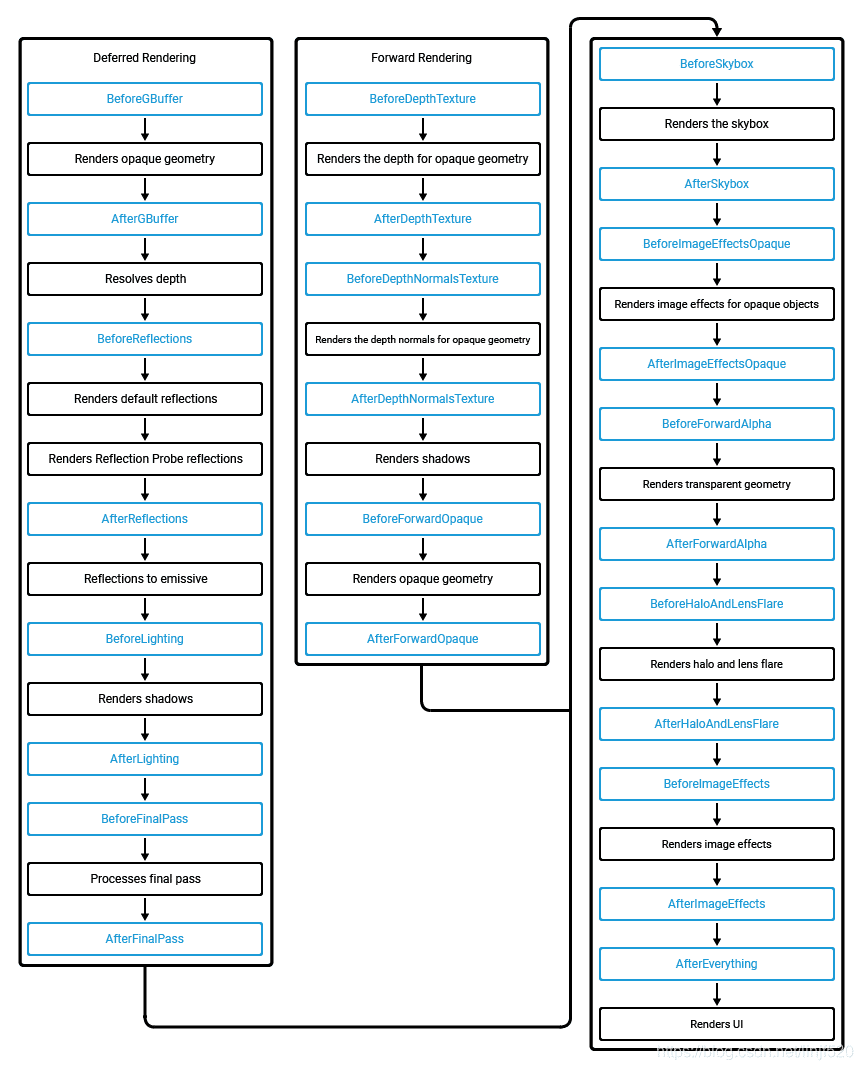
通过CommandBuffer对指定CameraEvent进行Blit(AfterSkybox, AfterForwardOpaque, AfterEverything),通过SetGlobalTexture设置全局纹理,替代GrabPass的纹理
关于CameraEvent可参考如下图
这里提供一个示例
1
2
3
4
5
6
7
8
9
10
11
12
13
14
15
16
17
18
19
20
21
22
23
24
25
26
27
28
29
30
31
32
33
34
35
36
37
38
39
40
41
42
43
44
45
46
47
48
49
50
51
52
53
54
55
56
57
58
59
60
61
62
63
64
65
66
67
68
69
70
71
72
73
74
75
76
77
78
79
80
81
82
83
84
85
86
87
88
89
90
91
92
93
94
95
96
97
98
99
100
101
102
103
104
105
106
107
108
109
110
111
112
113
114
115
116
| public class GrabScreen : MonoBehaviour
{
public bool isEnableCustom = false;
private bool preEnableCustom = false;
private Camera camera;
private CommandBuffer blitColorBufCommandBuffer;
private CommandBuffer blitDepthBufCommandBuffer;
private CommandBuffer blitBackBufCommandBuffer;
public RenderTexture colorBuffer;
public RenderTexture depthBuffer;
public RenderTexture colorTex;
public RenderTexture depthTex;
private void Start()
{
camera = GetComponent<Camera>();
RenderTarget();
}
private void RenderTarget()
{
if (preEnableCustom != isEnableCustom)
{
preEnableCustom = isEnableCustom;
if (isEnableCustom)
{
colorBuffer = new RenderTexture(Screen.width, Screen.height, 0, RenderTextureFormat.RGB111110Float);
depthBuffer = new RenderTexture(Screen.width, Screen.height, 24, RenderTextureFormat.Depth);
colorTex = new RenderTexture(Screen.width, Screen.height, 0, RenderTextureFormat.RGB111110Float);
depthTex = new RenderTexture(Screen.width, Screen.height, 0, RenderTextureFormat.R16); // RHalf,注意这里别使用RHalf,否则精度没有原来的RenderTextureFormat.Depth的那么高,在正交相机模式下很明显,透视没什么问题
colorBuffer.name = "Grab - ColorBuffer";
depthBuffer.name = "Grab - DepthBuffer";
colorTex.name = "Grab - ColorTexture";
depthTex.name = "Grab - DepthTexture";
blitColorBufCommandBuffer = new CommandBuffer();
blitColorBufCommandBuffer.name = "AfterSkyBox - BlitColor";
blitColorBufCommandBuffer.CopyTexture(colorBuffer.colorBuffer, colorTex.colorBuffer);
camera.AddCommandBuffer(CameraEvent.AfterSkybox, blitColorBufCommandBuffer);
blitDepthBufCommandBuffer = new CommandBuffer();
blitDepthBufCommandBuffer.name = "AfterForwardOpaque - BlitDepth";
blitDepthBufCommandBuffer.Blit(depthBuffer.depthBuffer, depthTex.colorBuffer);
camera.AddCommandBuffer(CameraEvent.AfterForwardOpaque, blitDepthBufCommandBuffer);
blitBackBufCommandBuffer = new CommandBuffer();
blitBackBufCommandBuffer.name = "AfterEverything - BlitBackBuf";
blitBackBufCommandBuffer.Blit(colorBuffer.colorBuffer, (RenderTexture)null);
camera.AddCommandBuffer(CameraEvent.AfterEverything, blitBackBufCommandBuffer);
}
else
{
ReleaseCommandBuffer();
}
}
}
private void OnPreRender()
{
RenderTarget();
if (isEnableCustom)
{
colorBuffer.DiscardContents();
depthBuffer.DiscardContents();
colorTex.DiscardContents();
depthTex.DiscardContents();
Shader.SetGlobalTexture("_GrabScreenColorTex", colorTex);
Shader.SetGlobalTexture("_GrabScreenOpaqueDepthTex", depthTex);
camera.SetTargetBuffers(colorBuffer.colorBuffer, depthBuffer.depthBuffer);
}
else
{
camera.targetTexture = null;
}
}
private void ReleaseCommandBuffer()
{
Destroy(colorBuffer);
Destroy(depthBuffer);
Destroy(colorTex);
Destroy(depthTex);
if (blitColorBufCommandBuffer != null)
{
camera.RemoveCommandBuffer(CameraEvent.AfterSkybox, blitColorBufCommandBuffer);
blitColorBufCommandBuffer.Dispose();
blitColorBufCommandBuffer = null;
}
if (blitDepthBufCommandBuffer != null)
{
camera.RemoveCommandBuffer(CameraEvent.AfterForwardOpaque, blitDepthBufCommandBuffer);
blitDepthBufCommandBuffer.Dispose();
blitDepthBufCommandBuffer = null;
}
if (blitBackBufCommandBuffer != null)
{
camera.RemoveCommandBuffer(CameraEvent.AfterEverything, blitBackBufCommandBuffer);
blitBackBufCommandBuffer.Dispose();
blitBackBufCommandBuffer = null;
}
}
private void OnDestroy()
{
ReleaseCommandBuffer();
}
}
|